Project Status Monitoring System
Know where every project and contract stands.
PSMS keeps your office's contract schedules, accomplishment, suspensions, time extensions and billings in one place, and turns them into S-curves, slippage, COA-ready reports and a map of where work is behind.
Works in any browser and on phones. No installation, no credit card to start.

Features
Everything your office tracks, worked out for you
Encode what happened on the ground. PSMS does the arithmetic the same way every time: targets, slippage, expiry dates, weighted accomplishment and totals.
Contract monitoring and S‑curves
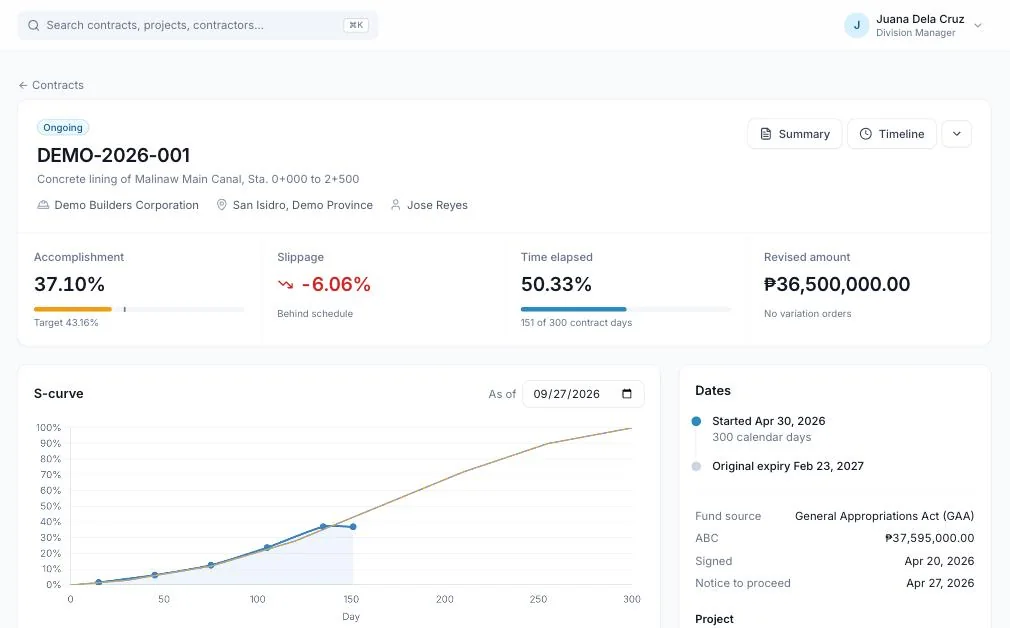
Every contract shows its target versus actual accomplishment, slippage, time elapsed and revised amount, as of any date you choose.
- Planned and actual S-curves; the plan pauses automatically while work is suspended
- Suspensions and resumes, variation orders and time extensions, with revised expiry dates
- Billings, physical features (metres of canal, turnouts…) and a printable timeline
Reports you can submit
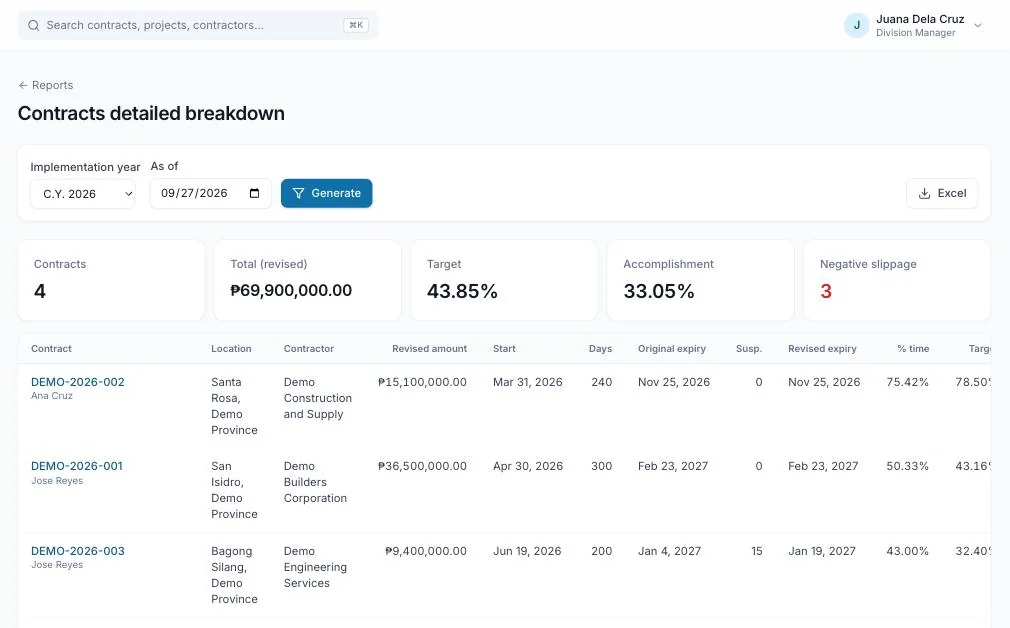
Standard reports for contracts, projects, fund sources and expenditures, each as of any date, with one-click Excel.
- PPA report (COA Annex B), detailed contract breakdown and overall S-curve
- Project accomplishment, fund source summary and expenditures by year
- Build your own reports: pick columns, filters, grouping and a chart, then save and share them
See it on a map
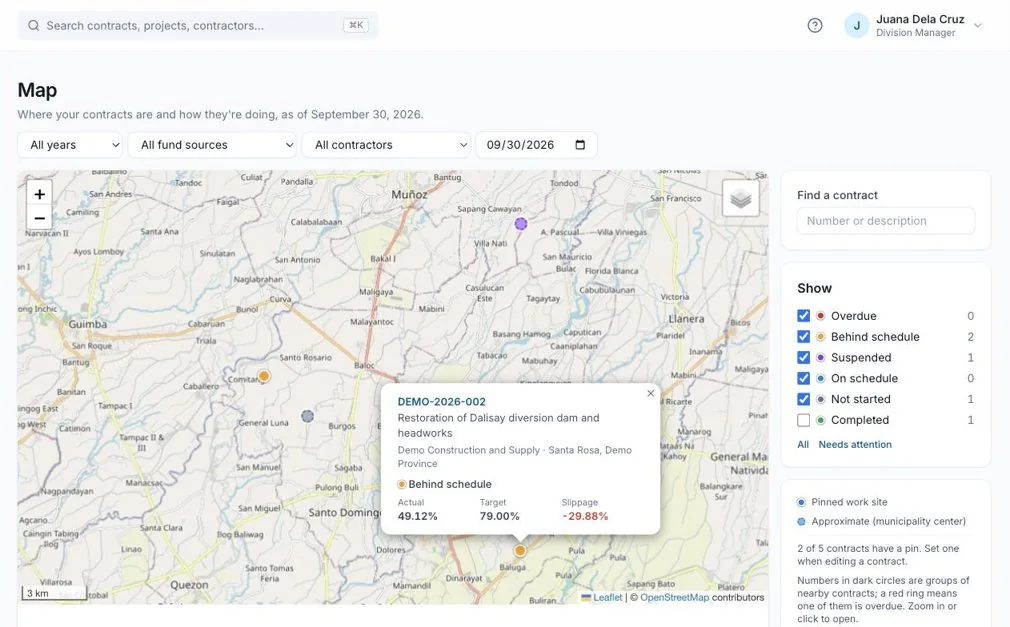
Every contract on a map, colored by status, so you can see at a glance where work is overdue, behind or suspended.
- Filter by year, fund source and contractor; find any contract in seconds
- Pin each work site by tapping the map, using your phone's location, or from a site photo
- Contracts without a pin still appear at their municipality, from day one
Site photos from the field
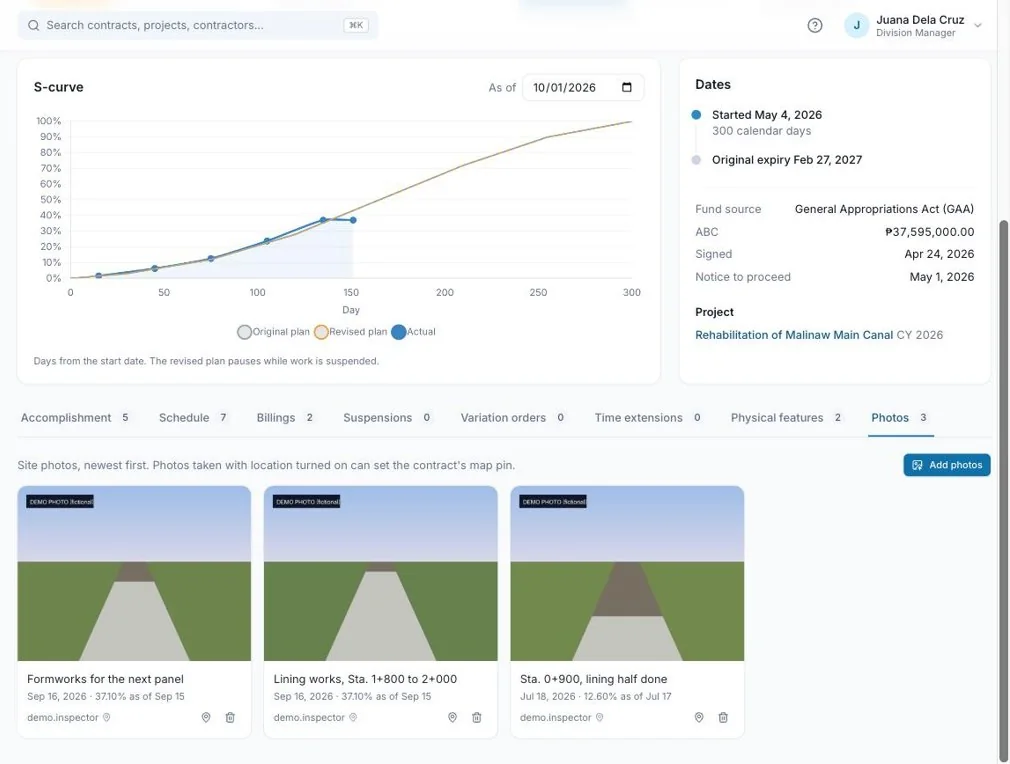
Inspectors add photos from their phones when they record accomplishment, building a photo timeline for every contract.
- Take photos straight from the phone camera, including iPhone photos
- A photo's location can place the contract on the map
- Photos are resized and cleaned of embedded data; only your office can open them
A weekly digest
Every Monday, Account Holders get an email listing contracts that became overdue, fell further behind, expire soon or haven't been updated.
Roles for your team
Account Holders, Project Inspectors, Engineering Personnel, Financial Encoders and Viewers each see and change only what they should.
A full activity log
Who changed what, and when. Entries lock after a day for everyone but the Account Holder, so reported figures can't change quietly.
Project finance
Allocations, expenditure sources, obligations, disbursements and requested cash, with balances per project and fund source.
How it works
Up and running in an afternoon
Register your office
Create your office's workspace in a few minutes and start a 30-day free trial. You become its Account Holder.
Add your team and lists
Invite inspectors, engineers and finance staff with the right roles, then add your systems, fund sources and contractors.
Add projects and contracts
Enter each contract's schedule, then record accomplishment as work progresses. Dashboards, reports and the map update right away.
Step-by-step help is in the PSMS user guide.
Your data
Kept separate, backed up, and yours
Separate per office
Each office sees only its own projects, contracts, photos and reports.
Hosted on Google Cloud
Runs in Google Cloud's Singapore region, over HTTPS.
Backed up daily
Daily backups kept for two weeks, with point-in-time recovery for the last seven days.
Export any time
Every report downloads to Excel, so your figures are never locked in.
Questions
Frequently asked
Do we need to install anything?
No. PSMS runs in the browser on computers and phones. Your team signs in at app.psms.ph.
How much does it cost?
Every office starts with a 30-day free trial. After that, offices subscribe monthly or yearly. Email admin@syncster.dev for pricing.
We already use the old PSMS. Is our data still there?
Yes. Everything from the previous version was carried over, and your usernames and passwords are unchanged. See what's new.
How are the numbers calculated?
The user guide explains every figure, including how suspensions and time extensions affect expiry dates and targets: how the numbers are calculated.
What happens if our subscription lapses?
Account Holders get reminders a week and a day before. If it lapses, the office becomes inactive, but nothing is deleted; everything is back as soon as it's renewed.
Where do we get help?
The user guide covers every screen, the in-app forum connects you with other offices, and you can email admin@syncster.dev.
Start monitoring with PSMS
Register your office and try every feature free for 30 days.